
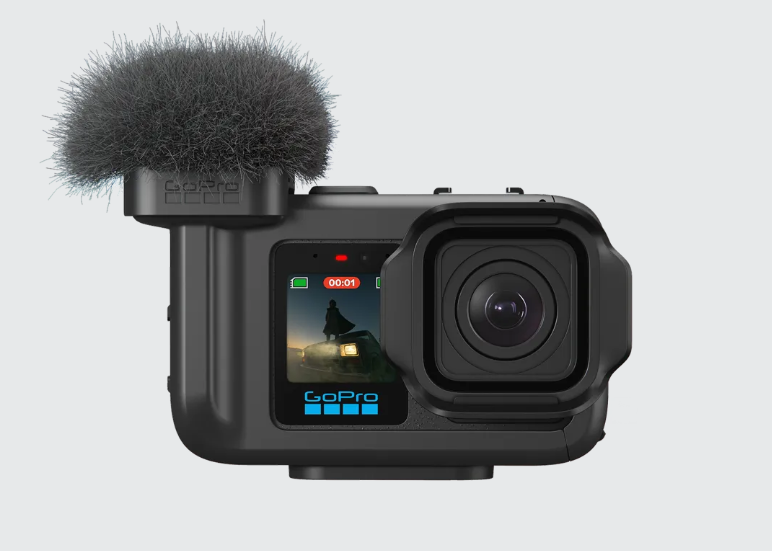
The GoPro Mission 1 Media Mod is a considerable step up from the relatively simple microphone system found on previous GoPro Media Mods.
Instead of merely choosing whether the microphone should listen to the front or rear of the camera, the Mission 1 Media Mod features a three-microphone array, beamforming technology and eight different pickup patterns.
Yes, eight. It’s the spider of media mods… (which makes total sense if your expectation for quality jokes is really scraping the bottom of the barrel). Either way, GoPro apparently decided that choosing between “front” and “back” was no longer complicated enough. So GoPro have given us LOTS more options.
But what do Cardioid, Focused Stereo and Variable Stereo actually mean? More importantly, which one should you use when recording?
Let’s sound this out.
A Three-Microphone Beamforming System
The Mission 1 Media Mod contains a three-microphone array. Beamforming technology combines the signals from those microphones to emphasize sound coming from particular directions while reducing sound from others.
In simple terms, the Media Mod can electronically point its ears in different directions without physically moving the microphones. It is basically selective hearing, but unlike most people, it does it when you ask (No, I will not apologize for these jokes!).
GoPro lists the following eight pickup modes:
- Cardioid
- Rear Cardioid
- Bidirectional
- Omnidirectional
- Focused Stereo
- Natural Stereo
- Immersive Stereo
- Variable Stereo
The first four are primarily directional patterns, while the remaining four concentrate more on stereo width and spatial sound. At the time of writing, GoPro names these patterns but does not provide detailed polar diagrams showing exactly how each one behaves (although the camera menu does have some tiny diagrams if you can squint hard enough to see them). The explanations below therefore combine GoPro’s published information with the conventional behavior normally associated with these microphone patterns. In other words, “this is what they should do”, my ongoing real-world tests will determine whether they perform as promised or simply create eight exciting new ways to record wind noise (from actual wind, not from ya know… overeating beans)(I didn’t promise mature jokes either).

Cardioid
Cardioid will probably be the main setting for traditional vlogging, interviews and talking-head videos.
A cardioid pattern concentrates primarily on sound coming from in front of the camera while reducing sound from the sides and rear. When the camera is pointed at somebody speaking, Cardioid should help prioritize that person’s voice while reducing the camera operator, people standing behind the camera and some surrounding environmental noise. It is called Cardioid because the pickup pattern is roughly heart-shaped. So you really can claim that a persons words…. touched your heart… shaped pickup pattern.
Cardioid should work best for:
- Talking-head videos
- Interviews
- Presentations
- Product demonstrations
- Filming somebody speaking in front of the camera
- Reducing commentary from behind the camera
Cardioid will not completely eliminate sound coming from other directions. It should simply make whatever is in front of the camera more prominent. This will probably be the safest general-purpose choice when the subject you want to hear is also the subject appearing in the video.
Rear Cardioid
Rear Cardioid reverses the standard Cardioid pattern. So an upside down heart-shaped pattern. Instead of prioritizing the person in front of the camera, it concentrates on sound coming from behind it. This makes it particularly useful for traditional GoPro filming, where the camera is pointed toward the action while the person holding it provides commentary.
Rear Cardioid should work best for:
- Walking tours
- Behind-the-camera narration
- Travel videos
- Demonstration videos
- Filming scenery while speaking
- Recording commentary from the camera operator
- Being a Karen on YouTube as you shout at some poor innocent bystander.
Imagine walking through a city while filming the buildings in front of you. Rear Cardioid should make your commentary more prominent without requiring you to continually turn the camera around. It could also be useful when filming a product, repair or demonstration while explaining what you are doing from behind the camera.
Of course, it may also pick up more breathing, clothing movement and the occasional censored four letter word muttered when you mess up said repair or demonstration. For creators who narrate from behind the camera, Rear Cardioid should have your back. If you didn’t see that pun coming, shame on you! Karen cowards rejoice! This is the pattern for you!

Bidirectional
Bidirectional recording captures sound from both the front and rear of the camera while reducing sound coming from the sides.
This pattern is sometimes called a figure-eight pattern because of the shape created when its sensitivity is displayed on a polar diagram (you probably didn’t even know there were diagrams of polar bears, but there you go!)
It is not called a figure-eight because you have to perform one while filming, although that would certainly improve audience retention, so what the heck, give it a go! On the Mission 1 Media Mod, Bidirectional should be especially useful when one person is standing in front of the camera and another person is speaking from behind it.
Bidirectional should work best for:
- Interviews with the presenter behind the camera
- Question-and-answer videos
- Two-person conversations
- Walk-and-talk interviews
- Product demonstrations involving two speakers
- Recording both the subject and camera operator
- Arguing with a Karen
For example, an interviewer could stand behind the Mission 1 while the person being interviewed stands in front. Both voices should be captured more clearly than they would be with a front-only or rear-only pattern. The trade-off is that sound directly beside the camera may be reduced. That can help in busy environments, although it may also make the person standing beside the camera feel ignored. Microphones can be cruel like that.

Omnidirectional
Omnidirectional recording captures sound from all around the camera. Instead of isolating one particular direction, it is designed to record the entire surrounding environment.
This can create a more natural representation of a scene, although it will also capture more background noise. And when it says all directions, it really means all directions. Your subject, the traffic, the person opening a bag of chips, a barking dog three houses away and possibly a lawnmower in another ZIP code all get invited to the recording.
Omnidirectional should work best for:
- Groups gathered around the camera
- Family events
- Round-table conversations
- Ambient sound
- Behind-the-scenes filming
- Situations where sound may come from any direction
Omnidirectional may be the best choice when you do not know exactly where the important sound will originate.
For example, if several people are speaking around the camera, a directional pattern might make one person sound clear while making another sound distant. Omnidirectional should provide more consistent coverage. The downside is that it will also pick up more crowds, room reflections, traffic and environmental noise. It hears everything. Good if you want those audio rich nature videos, bad if your neighbor loudly complains about the weirdo in the yard filming a chipmunk with his camera again. What? I was only wearing that chipmunk costume to blend in with nature…

Focused Stereo
Focused Stereo appears to combine a relatively narrow front-facing pickup area with stereo separation.
This should make the subject in front of the camera sound more prominent while retaining some left-to-right positioning and environmental detail. Unlike Cardioid, which may create a more concentrated or mono-like result, Focused Stereo should preserve a sense of width. It doesn’t however help you focus more on what you’re filming, if you have a mind that wanders, then it wanders regardless of what sound pattern you choose.
Focused Stereo should work best for:
- Vlogging with environmental sound
- Street filming
- Performances directly in front of the camera
- Product demonstrations
- Vehicle filming
- Situations where the main subject is centered in the frame
Focused Stereo could become one of the most useful everyday settings on the Media Mod. It should provide more atmosphere than Cardioid while remaining more controlled than a wider stereo mode. This could make it a good match for regular Wide or Linear digital lenses when the subject remains directly in front of the camera. It is essentially saying, “I’m listening to you, but I’m also aware that other things exist.”
A rare and valuable skill…… I think, I dunno, I wasn’t really paying attention.

Natural Stereo
Natural Stereo should provide a more conventional and balanced stereo recording.
Instead of heavily concentrating on the center or exaggerating the width of the sound-stage, it should aim to reproduce the scene in a way that sounds similar to actually being there.
Natural Stereo should work best for:
- General-purpose filming
- Travel videos
- Street scenes
- Indoor events
- Everyday action footage
- Recording natural environmental sound
Natural Stereo is likely to be the best starting point when you want a realistic soundtrack but do not need to isolate a particular person or noise. For example, while filming a market, Natural Stereo should allow voices, movement and environmental sounds to occupy different positions across the stereo field without making the recording feel unnaturally wide. It may become the audio equivalent of leaving the camera in its standard video mode: not necessarily the most specialized setting, but probably the most versatile. It is natural, balanced and unlikely to cause unnecessary drama.
So…….. nothing like social media at all.

Immersive Stereo
Immersive Stereo should create the widest and most spacious stereo soundstage available from the Mission 1 Media Mod.
The intention is likely to make the viewer feel surrounded by the environment rather than simply hearing sound coming from the middle of the screen.
Immersive Stereo should work best for:
- Landscapes
- Cities and crowds
- Live music
- Sporting events
- Vehicles passing the camera
- Nature recordings
- Wide establishing shots
- Travel and location footage
Immersive Stereo could work particularly well when filming with one of the camera’s wider fields of view. If a vehicle moves from one side of the frame to the other, for example, a wide stereo pattern should make that movement more noticeable in the audio. Used properly, it could make the viewer feel like they are standing inside the scene. Used badly, it could make them feel like they are trapped inside a bus station. Wider is not always better. If the main purpose of the video is to clearly record somebody speaking, Immersive Stereo may capture too much surrounding noise and make the voice feel less focused. It should be at its best when the environment is part of the story rather than something you are desperately trying to remove in post-production.
Variable Stereo
Variable Stereo is potentially the most interesting of the eight audio patterns.
GoPro says the Media Mod can match the width of its stereo capture to the camera’s field of view. This suggests that Variable Stereo may automatically—or possibly manually—adjust the width of the recorded soundstage to complement the selected digital lens. A narrow Linear shot could therefore use more focused stereo audio, while an Ultra Wide shot could use a broader soundstage.
Variable Stereo should work best for:
- Switching between different digital lenses
- General filmmaking
- Run-and-gun production
- Travel videos
- Documentary-style filming
- Creators who frequently change fields of view
Matching the audio width to the visual field of view makes a lot of sense. When the video shows a huge environment but the audio sounds narrow and centered, the result can feel disconnected. Likewise, extremely wide audio paired with a tightly framed subject may make the viewer hear sounds coming from areas they cannot see. Variable Stereo should help reduce that mismatch. At least, that is the theory. The actual implementation will probably be in the ears of the beerholder. (what? I know how you film, I’ve seen your footage!).
Which Mission 1 Audio Pattern Should You Use?
The simplest way to choose a pattern is to consider where the important sound is coming from. So this is my own kinda cheat sheet based on what I’ve been playing with so far…
Use Cardioid when:
The person you want to hear is standing in front of the camera.
Use Rear Cardioid when:
You are behind the camera and providing commentary.
Use Bidirectional when:
You need to record somebody in front of the camera and somebody behind it.
Use Omnidirectional when:
People or important sounds are located all around the camera.
Use Focused Stereo when:
You want a clear subject in front of the camera while retaining some stereo ambiance.
Use Natural Stereo when:
You want a balanced, realistic recording of the complete scene.
Use Immersive Stereo when:
The environment and width of the soundstage are important.
Use Variable Stereo when:
You want the audio width to complement the camera’s selected field of view.
And use whichever mode best records your neighbor’s lawnmower when it inevitably starts five seconds after you press Record.
32-Bit Float Audio Support
The Media Mod also supports 32-bit float recording using its integrated microphones or a compatible external microphone.
This provides much more flexibility when dealing with unexpectedly loud or quiet sounds. Traditional audio recording requires the gain to be set carefully. Set it too high and loud sounds may clip. Set it too low and quiet sounds may need to be heavily amplified during editing. A properly implemented 32-bit float workflow captures a much wider range of audio levels, allowing loud or quiet recordings to be adjusted in post-production with a lower risk of permanently losing the original signal. This should be useful when recording situations where the audio levels can change suddenly.
For example, somebody may be speaking quietly before a vehicle starts, a crowd cheers or you drop something expensive.
Again.
However, 32-bit float is not magic. It cannot remove wind noise, microphone distortion, handling noise or somebody shouting directly into the microphone from two inches away. It gives you more room to recover the recording, but it cannot make poor microphone placement sound good.
It is 32-bit float, not 32-bit miracle.
External Microphones and Audio Monitoring
The Mission 1 Media Mod includes three 3.5mm audio connections.
These support external microphones, line-in audio, linear time-code synchronization and low-latency headphone or headset monitoring.
The Media Mod can also work with the Mission 1 camera’s multi-track recording system, allowing up to three audio streams to be stored within a single video file. That means the Media Mod is not limited to improving the camera’s built-in microphones. A creator could potentially record the Media Mod microphone, an external microphone and another supported audio source as separate tracks. Those tracks could then be selected, balanced or repaired during editing. This is particularly useful when one audio source sounds excellent and another sounds as though it was recorded from inside a kitchen cupboard.
Headphone monitoring is equally valuable. Being able to hear the audio while recording makes it much easier to notice wind noise, interference, cable problems or a microphone that has stopped working. Because discovering those problems during filming is helpful. Discovering them after a four-hour shoot is either character building or the reason someone gets fired from a filming shoot!

Don’t Forget the Windscreen
The Mission 1 Media Mod includes a removable windscreen.
That will be particularly important when using the wider stereo modes outdoors. A microphone may be capable of producing a beautifully spacious recording, but that will not help if the entire soundtrack sounds like the camera has been launched into a hurricane. Even with the windscreen attached, strong wind may still cause problems. It should therefore be treated as wind reduction rather than complete wind elimination. Camera movement can also generate airflow across the microphones, especially when the camera is attached to a vehicle, bicycle or extension pole. The faster you travel, the more your carefully selected microphone pattern may become “Aggressive Whooshing Stereo.” (Which is not one of the official supported audio modes).

Is the Mission 1 Media Mod Waterproof?
No.
I shouldn’t have to tell people this, but apparently I do. It’s an unfortunately world in which we live…
The Mission 1 Media Mod is described as weather-resistant, but it is not waterproof and should not be used underwater. This is important because the Mission 1 camera itself may be designed to survive much harsher conditions than the accessories attached to it. Rain and brief exposure to poor weather may be acceptable within the product’s rated limits, but the Media Mod should be removed before submerging the camera. Otherwise, your eight audio patterns may quickly become one audio pattern:
Silence.
Final Thoughts
The Mission 1 Media Mod appears to offer one of the most advanced integrated microphone systems GoPro has produced.
Previous Media Mods were useful primarily because they provided an external microphone input and more directional onboard audio. The Mission 1 version goes considerably further by offering beam-forming, eight pickup patterns, 32-bit float recording, headphone monitoring, time-code support and multi-track audio. For most creators, Cardioid, Rear Cardioid and Natural Stereo will probably cover the majority of everyday filming. Bidirectional could be extremely useful for interviews, while Focused Stereo may provide the best compromise between voice clarity and environmental sound. Immersive Stereo should suit wide landscapes, crowds, vehicles and live events, while Variable Stereo has the potential to create a more natural relationship between what the viewer sees and what they hear.
The real test will be hearing how effectively the Media Mod separates voices, handles wind, rejects unwanted sound and creates convincing stereo width in real-world conditions.
Either way, with 8 pickup patterns and support for Bluetooth mics and external mics, the Mission 1 series media mod gives you endless possibilities to capture the greatest of cinematic footage…. and one perfectly recorded take ruined by a delivery truck reversing somewhere in the distance.
Beep.
Beep.
Beep.

This article contains affiliate links. If you purchase through one of these links, DemonView may earn a commission at no additional cost to you. Running DemonView websites and YouTube do however cost me money and unfortunately trying to sell feet pics on OnlyFans didn’t work out too well. I mean, how I was I supposed to know the photos should have been of MY OWN feet? It’s not like the people in the graveyard were using their feet anyway. So now I have to pay for some rather large legal fee’s as a result of that mistake. Anyway, please support DemonView.com and use them there affiliate links so this site can be maintained. Thank you!
 English